
Products

Your Enterprise Identity, Secured at the Core.

Identity Governance & Administration

The right access for every employee, from the first day to the last.

KOREUM automates the identity and account lifecycle: HR data becomes accounts, access requests pass through layered approval, and every change is recorded for audit.
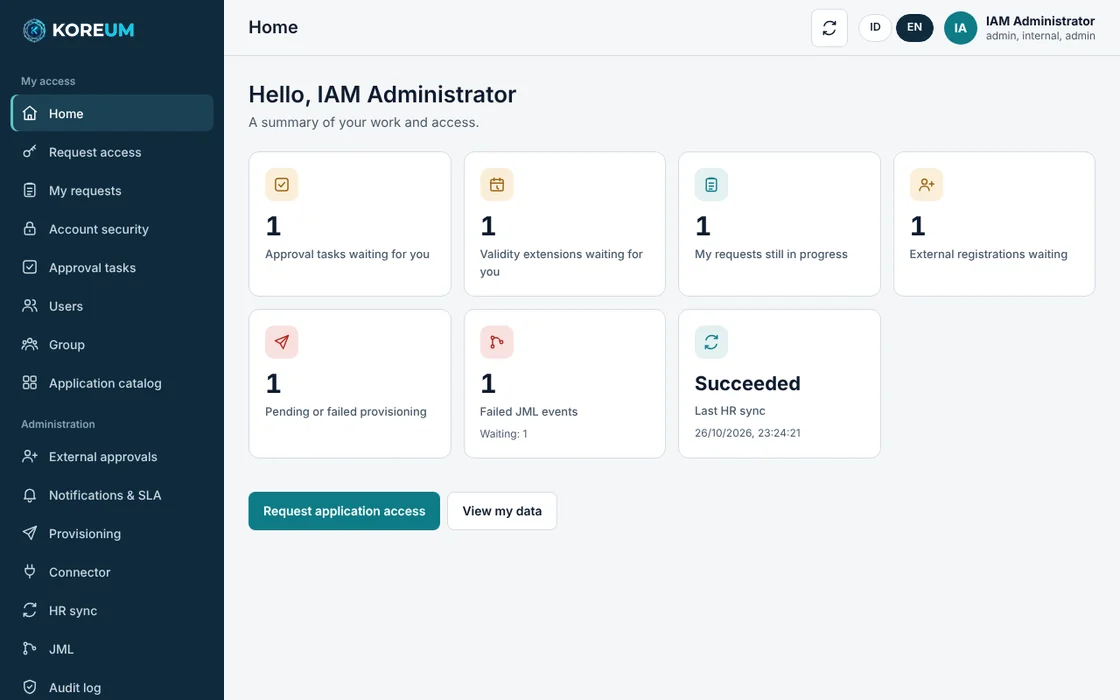
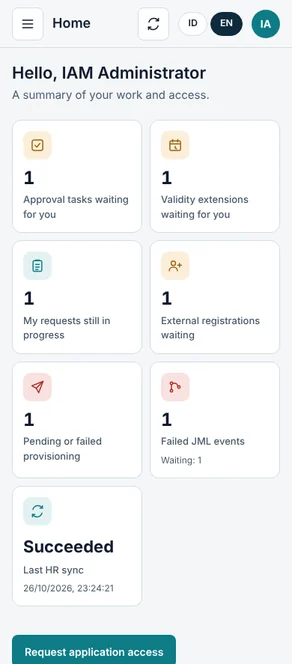
KOREUM home page with approval tasks, requests in progress and the last HR sync
KOREUM home page on a phone
6connector types: Database, REST API, LDAP, Active Directory, SSH, Disconnected
≤ 6approval stages per application, with SLA reminders and escalation
DailyHR data sync via SFTP, automatic Joiner–Mover–Leaver
15audit-ready reports in CSV, Excel or PDF
100%of activity in the audit log, archived monthly (CEF)

The challenge

Managing access by hand is slow and risky

New hires wait

Accounts are created ticket by ticket, so the first day is spent waiting for access.

Access left behind

Employees change jobs or leave, yet their old accounts and roles stay active.

Audits are hard to prove

Who approved what, and when, is scattered across email and spreadsheets.

How it works

From HR data to application access, with no manual tickets

  1. 01HR file (CSV)Via SFTP, daily at 22:00
  2. 02HR SyncWhole-file validation; bad files rejected
  3. 03JML engineJoiner, mover, leaver, rehire
  4. 04AccessBirthright at once; requests via approval
  5. 05Target appsAccounts and roles via connectors

Audit service records every step in Elasticsearch: who, when, from which IP, and the before/after values.

Key capabilities

One platform for the whole identity lifecycle

Self-service access requests

Many applications, one request — a workflow per application, a decision per role

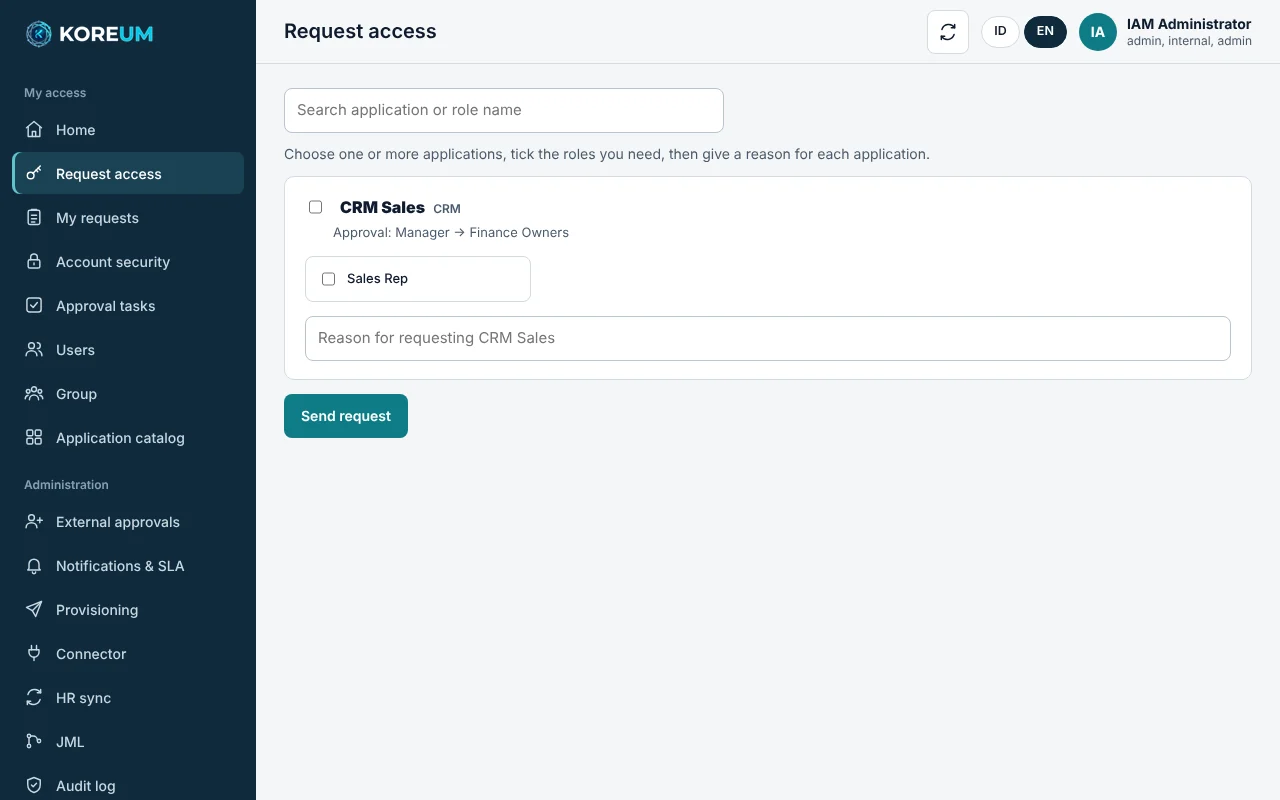
Search for an application or role, tick roles from several applications at once, give a reason per application and send. Each application has its own form and workflow.
  • Up to 6 approval stages: manager, group or a named user
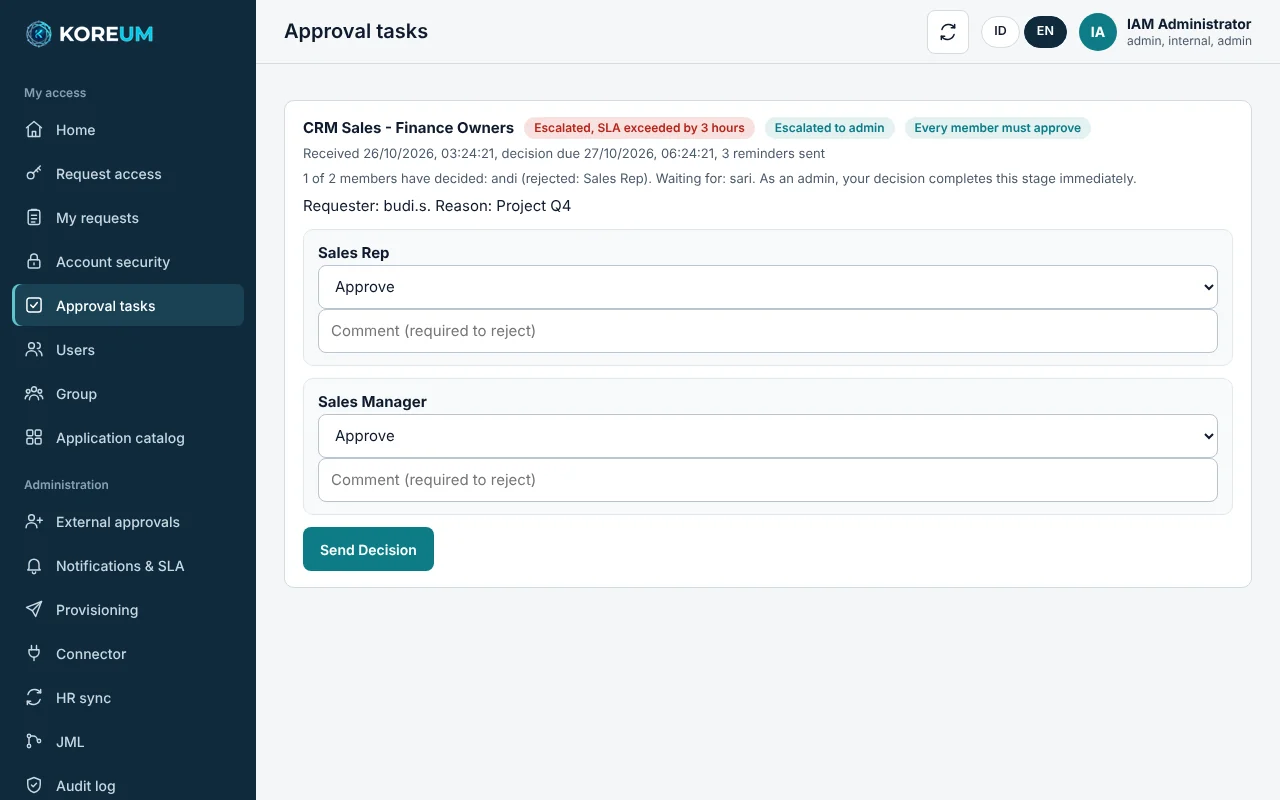
  • Groups: any member or all members must approve; one rejection rejects that role
  • Approve some roles; a rejection needs a comment. Only approved roles move on
  • SLA per stage, repeated reminders, then escalation to the admin
  • Requesters never approve their own request, and track status under My requests
Access request page with CRM roles selected
Access request: one batch for many applications
Approval task page with per-role decisions and the all-members rule
Approval task with per-role decisions and SLA status

Joiner · Mover · Leaver

Access follows employee changes

HR data is the identity source of truth. Accounts and birthright access are created, adjusted and revoked automatically.
  • Joiner: account and birthright granted at once, no approval
  • Mover: birthright that no longer fits is revoked
  • Leaver: requests cancelled, all access and accounts revoked — only from the retirement date, never from missing rows
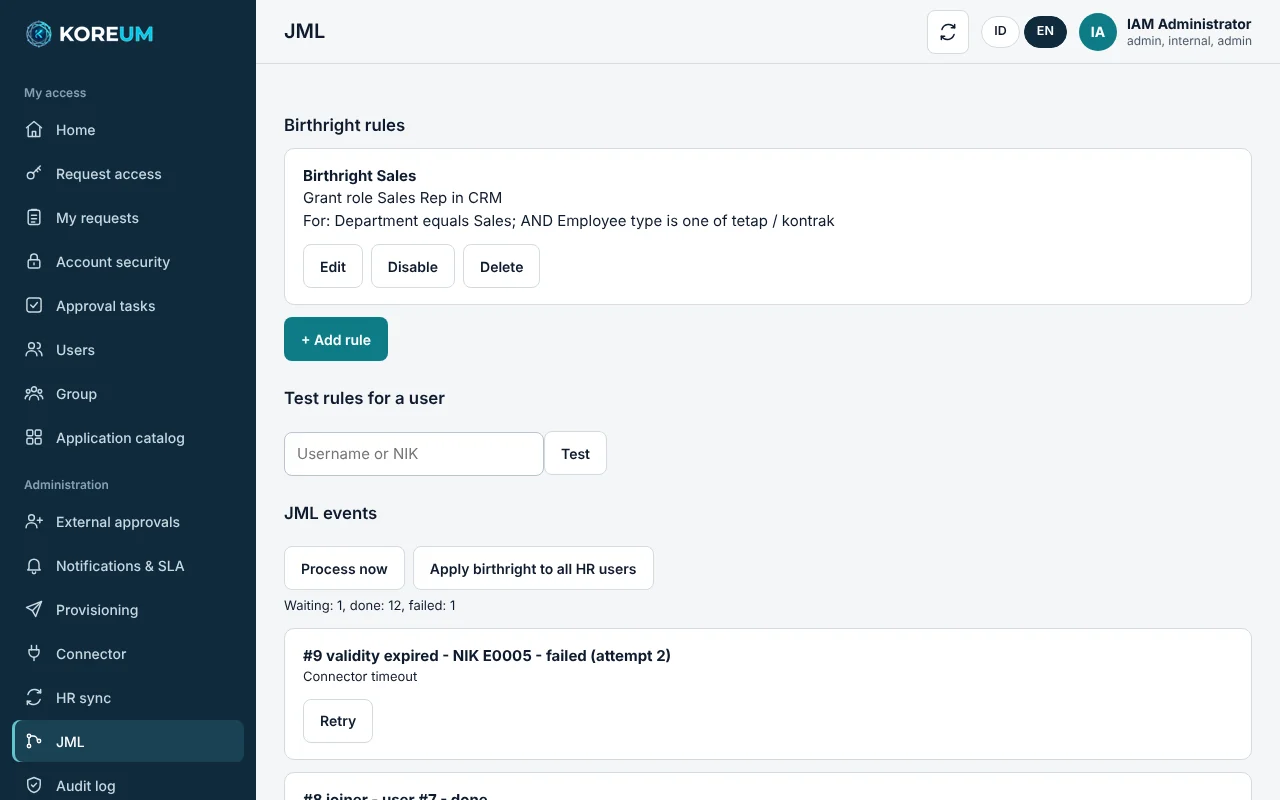
  • Birthright rules use HR attributes: department, position, employee type and more
  • Bad HR files are rejected whole; nothing is half-processed
External usersVerified self-registration with NDA and T&C. Accounts are valid for 90 days (configurable), extended with manager approval, and all access is revoked on expiry.
Birthright rules and JML events page
Birthright rules and JML events

Provisioning & reconciliation

Generic connectors, and disconnected applications stay under control

Connectors with per-step retry: if a run fails midway, only the failed step is repeated. Applications with no reachable API get provisioning tasks instead.
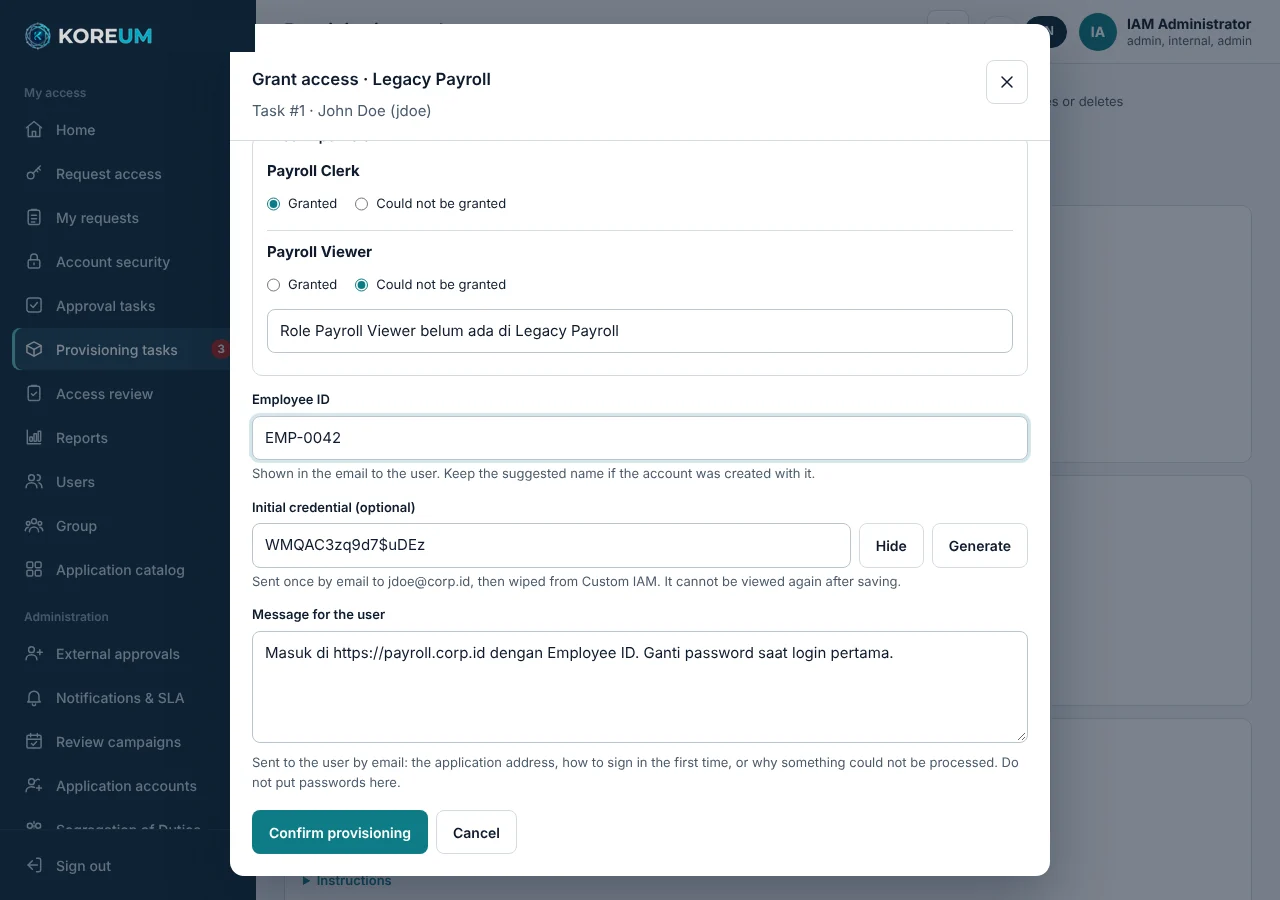
  • Disconnected apps: the application administrator confirms the result per role, account name and initial credential
  • The credential is sent once and stored encrypted only until the email goes out
  • Role catalog sync on a schedule; missing roles are flagged, not deleted
  • Account sync matches target accounts to IAM users; orphan and dormant accounts are flagged, never changed automatically
Process-task dialog: result per role, account, initial credential and a message for the user
Manual provisioning task for a disconnected application

Access review & Segregation of Duties
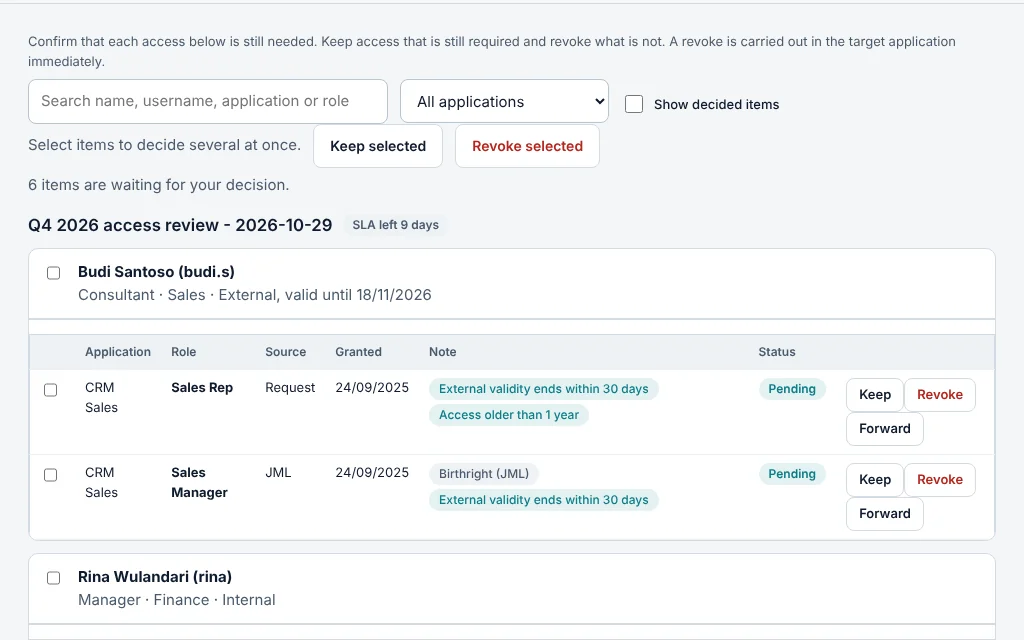
Periodic review campaigns, and no one holds two conflicting roles

  • Reviewer: direct manager or application owner; keep, revoke or forward, many items at once
  • Reminders before the deadline, escalation after it; nobody reviews their own access
  • SoD rule matrix across applications; requests that break a rule are refused
  • Daily scans and scans after access changes; new violations are emailed
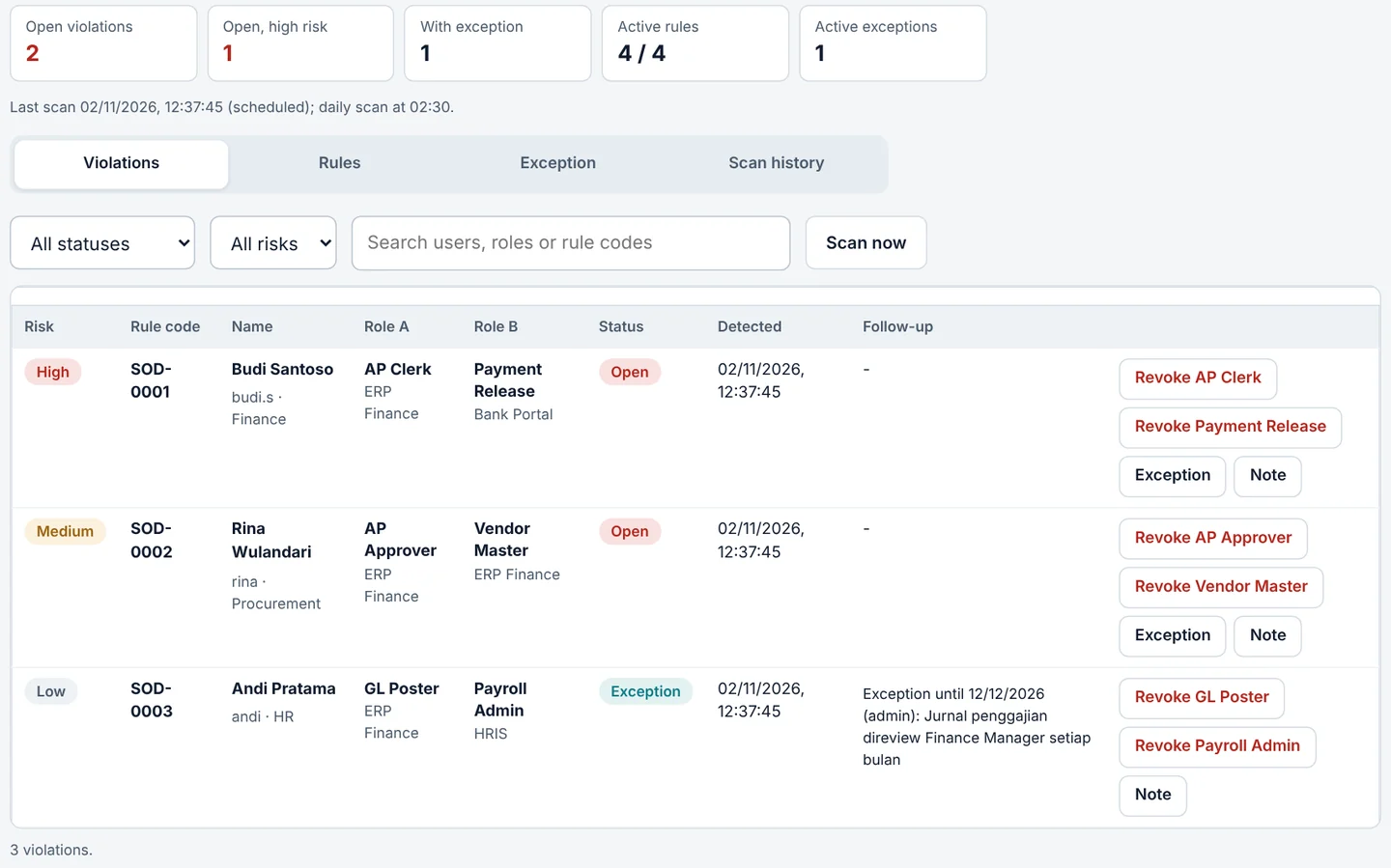
  • Controlled exceptions of at most 365 days, with a business reason and a mitigating control
Access review page with items per person
Access review campaign
SoD violations with risk, both roles, status and follow-up buttons
SoD violations and follow-up

Reports & audit

Fifteen audit-ready reports, and every change recorded and archived

  • Account population, approvals, access review, JML, orphaned and inactive accounts
  • Provisioning activity, SoD violations, and seven NHI and AI agent reports
  • Download as CSV, Excel or PDF; every report view and download is itself audited
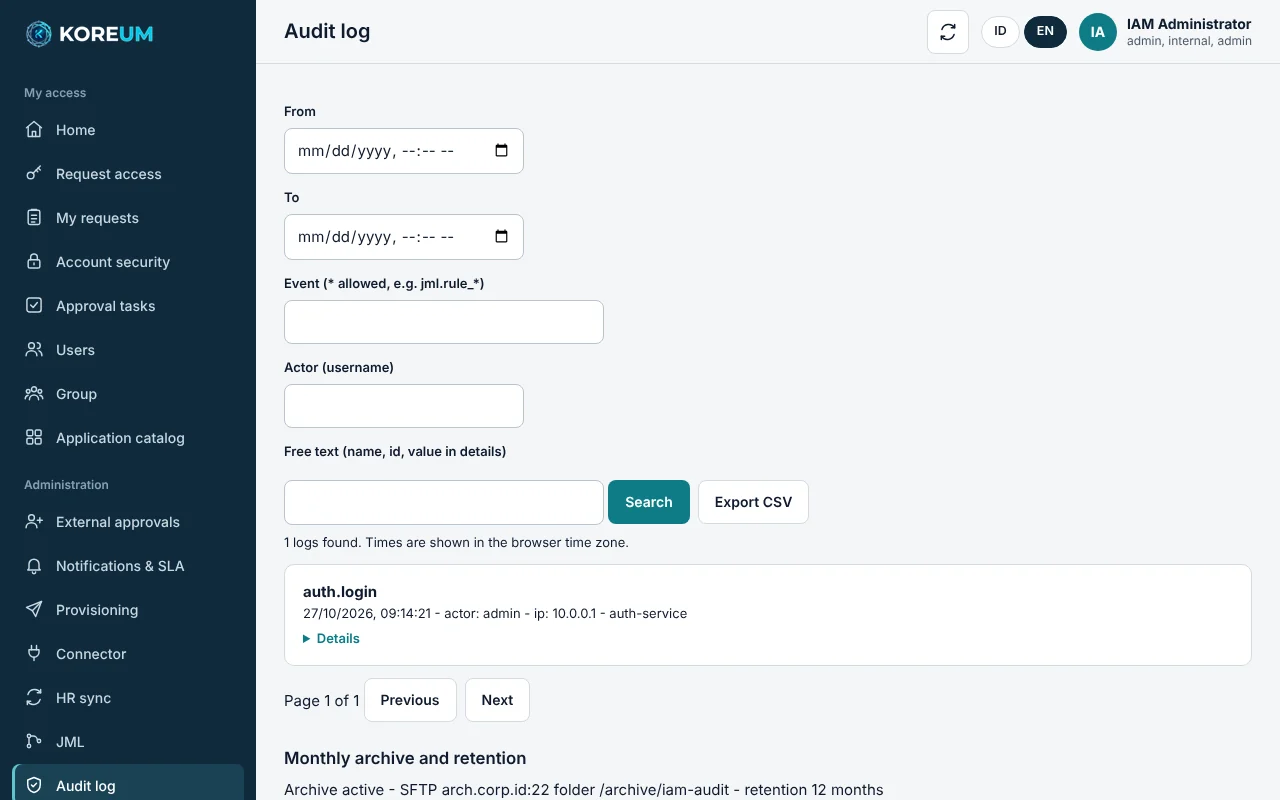
  • Audit log search by time, event, actor or text; before and after values for every change
  • CSV export of up to 50,000 rows
Monthly archiveCompressed CEF + SHA-256 to SFTP. Default retention 12 months; an index is deleted only once its archive is verified.
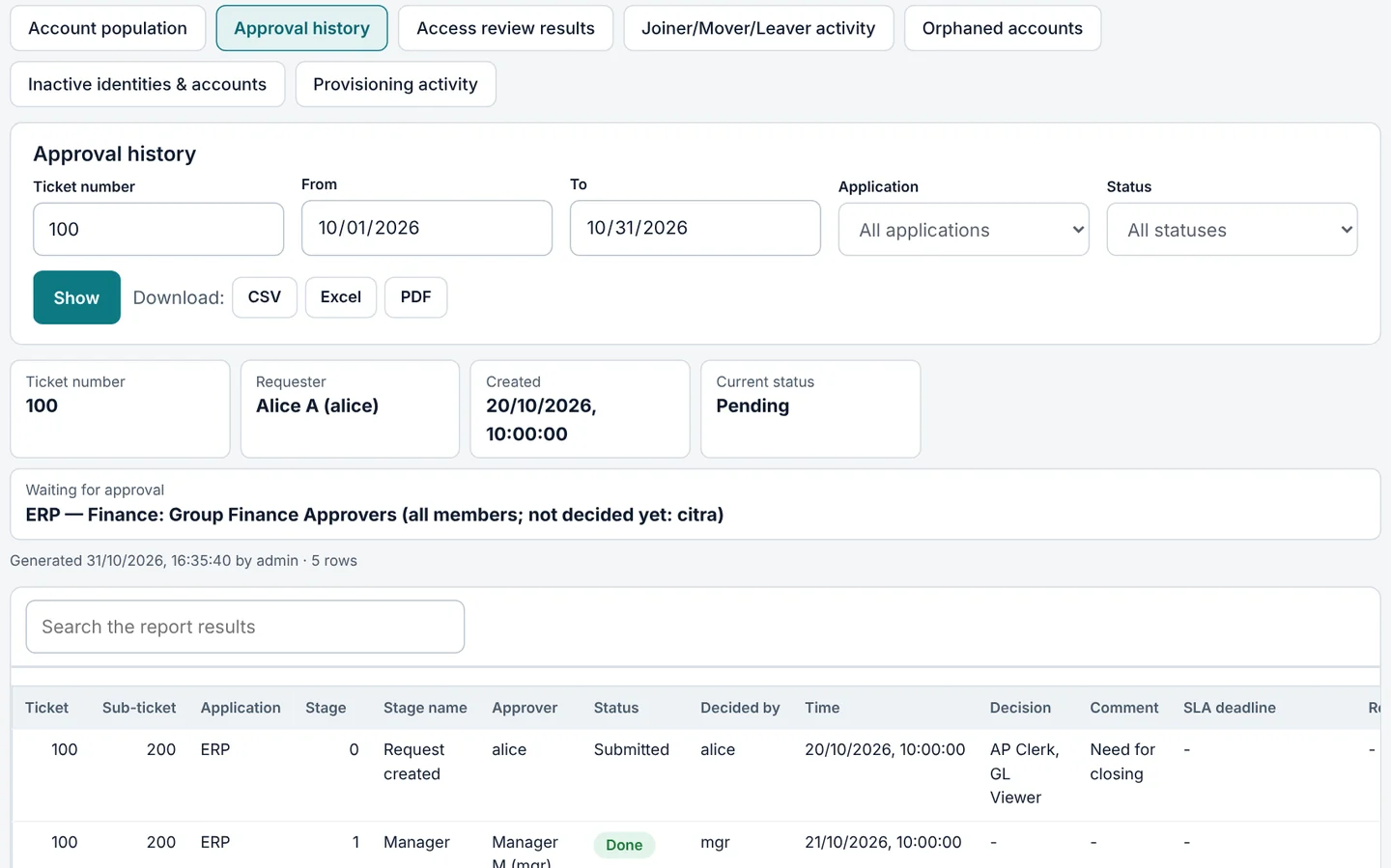
Approval history report for one ticket: stages, approvers and the group it is waiting for
Approval history report
Audit log page with event filters and monthly archive settings
Audit log with filters and archive status

Non-human identities & AI agents

Every machine account has a sponsor, and AI agents work within limits approved by people

A registry of service accounts, workloads, API clients and AI agents, governed with the same approval, review, SoD and reports as people.
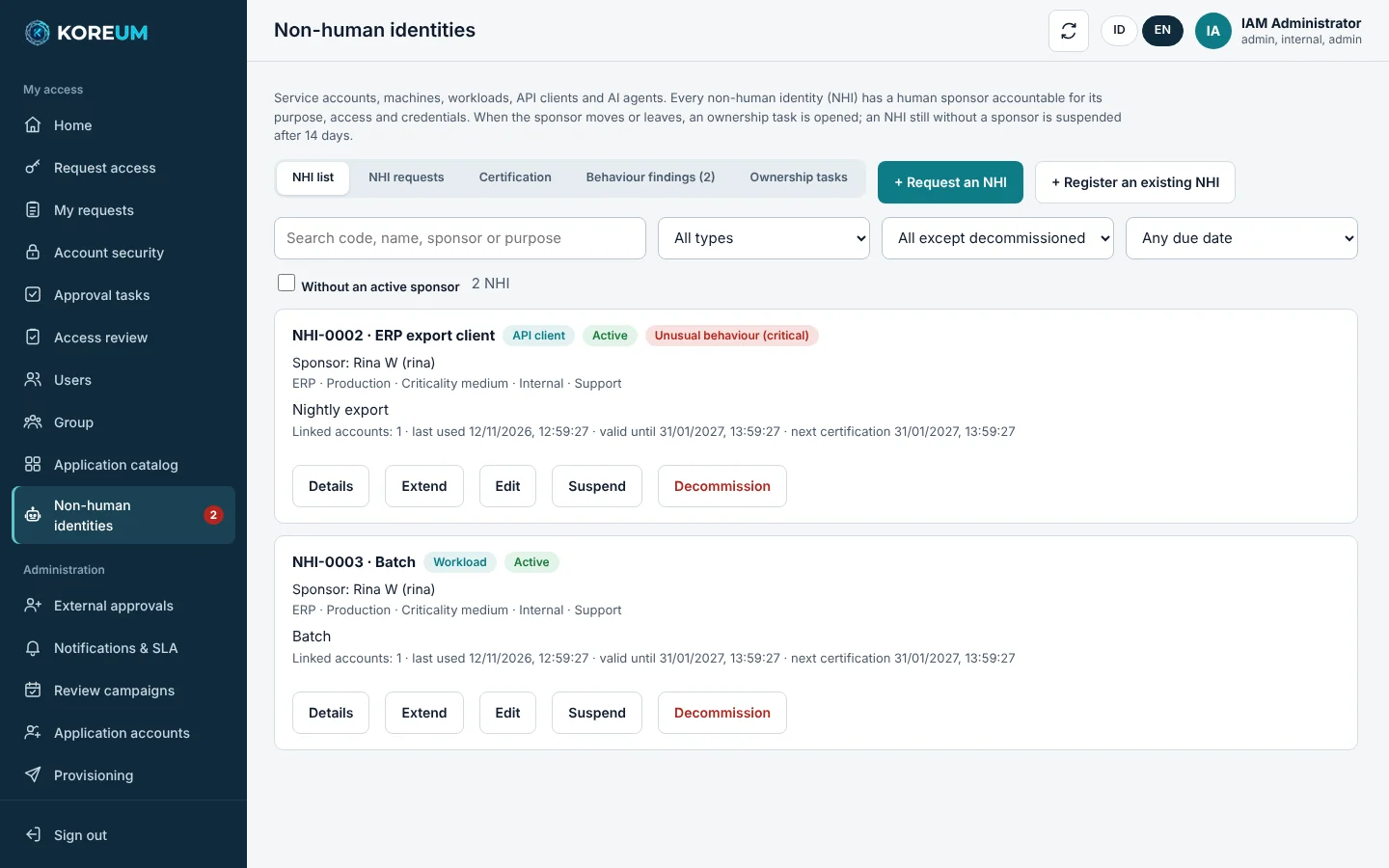
Non-human identities

  • A human sponsor for every NHI; ownership tasks when the sponsor moves or leaves
  • Approval, validity and certification; roles held when suspended or expired
  • Credentials recorded without secret values, with rotation reminders
  • Short-lived OAuth tokens of up to 15 minutes
No sponsor, no accessAn NHI without an active sponsor for 14 days is suspended and its roles revoked.
Non-human identity list with sponsor, status and the unusual behaviour label
Non-human identity registry

AI agents

  • Tools and MCP servers as roles; suggest, approve or bounded autonomy per agent
  • Write actions approved by the sponsor; on-behalf tokens hold shared rights only
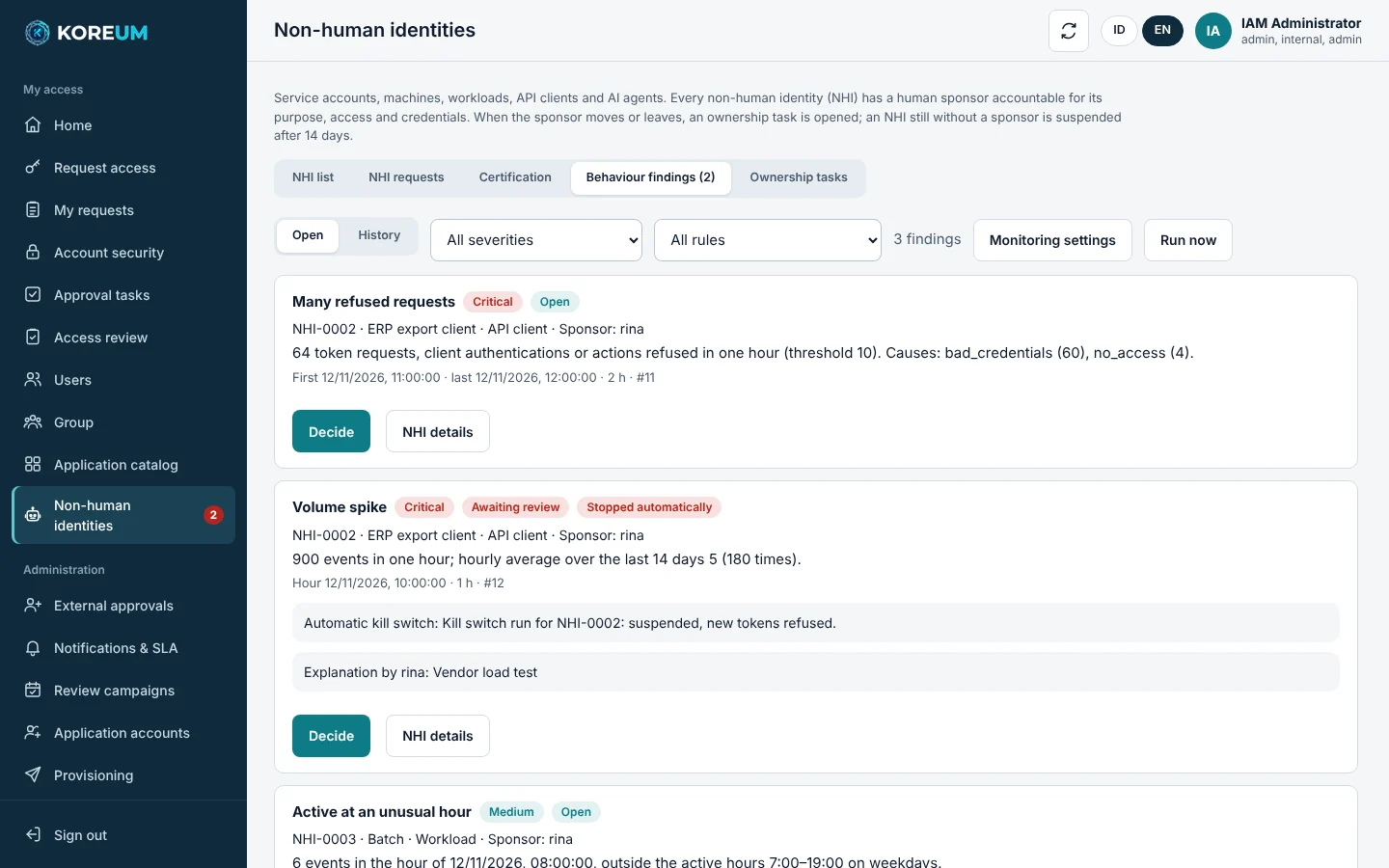
  • Behaviour monitoring: spikes, refusals, unusual hours and new tools
Kill switchSuspends an agent and revokes its tokens at once — automatically for critical findings.
Behaviour findings tab with a critical finding, a finding awaiting review and the Decide button
Behaviour findings for AI agents

Built-in connectors

Connect to the applications you already run

  • DBDatabase Table · user, role and link tables
  • APIREST API · Basic auth, configurable endpoints and response mapping
  • LDAPLDAP · member attribute picked by object class
  • ADActive Directory · LDAPS with an internal CA certificate
  • SSHSSH · script per action, pinned host key fingerprint
  • TASKDisconnected · provisioning tasks for the application administrator

Security & compliance

Built-in security controls

  • OIDC/SAML SSO (Microsoft, Google, ADFS, company IdP); KOREUM as an OIDC/SAML IdP for other apps
  • MFA with an authenticator app (TOTP), required for admins and privileged roles
  • Configurable password policy and expiry; captcha after 2 failed sign-ins, then lockout
  • Personal data masked by role scope
  • External sign-up with email verification, NDA and T&C
  • AI agent kill switch and NHI behaviour monitoring
  • Periodic access review, 15 audit reports and SoD controls
  • Monthly CEF + SHA-256 audit archive to SFTP; configurable retention (default 12 months)

Technical specifications

Microservices in Docker containers

ArchitectureLaravel microservices in Docker: auth, identity, access, provisioning, HR sync, JML and audit
GatewayNginx; internal service-to-service APIs blocked at the gateway
FrontendNode.js, responsive, two languages (English and Indonesian)
DatabaseMySQL, cluster-ready
Audit logElasticsearch: monthly audit, daily agent activity
AuthenticationOIDC/SAML SSO and IdP, MFA (TOTP); 60-minute session
HR sourceCSV via SFTP, scheduled
UsersInternal (HR), external valid 90 days, NHI and AI agents
NotificationsEnglish SMTP email: tasks, SLA, escalation
DeploymentDocker Compose, Docker Swarm (HA), or Google Cloud Run

Recent releases

Delivered and ready to demo

11a–11b · DONEKOREUM as an OpenID Connect and SAML 2.0 IdP
12a–12b · DONEReports and Segregation of Duties
13–13a · DONEManual provisioning and direct access grants by admins
14a–14e · DONENon-human identities, AI agents and behaviour monitoring

Ready for a demo or a trial in your environment.

See it end to end: sign in, create an access request, approve it, then follow the provisioning result, the user’s access history and the audit log.

Contact us
logo